

The web portal
Your flying on a big screen, at app.fyshh.aero.
Sign in with your Fyshh Aero account and every flight you have synced from the FLT app is there: a dashboard of your flying, a logbook you can filter and export, each flight drawn at height over real terrain with every profile scrubbing together, your landing and manoeuvre analysis as the app computed it, and the lessons and notes your instructors have written.
A flight school signs in to the same portal and works as the school: every shared flight for debrief, every solo as it happens, and every student's record in one place.
For pilots
Everything the app recorded, laid out for a debrief rather than a cockpit
The portal shows what the FLT app computed on your phone and never recomputes a score. Where it adds something, it is the room a laptop or a tablet gives you: terrain, the whole flight's profiles at once, and your history side by side.
Dashboard
Your flying this month, and how far you have come
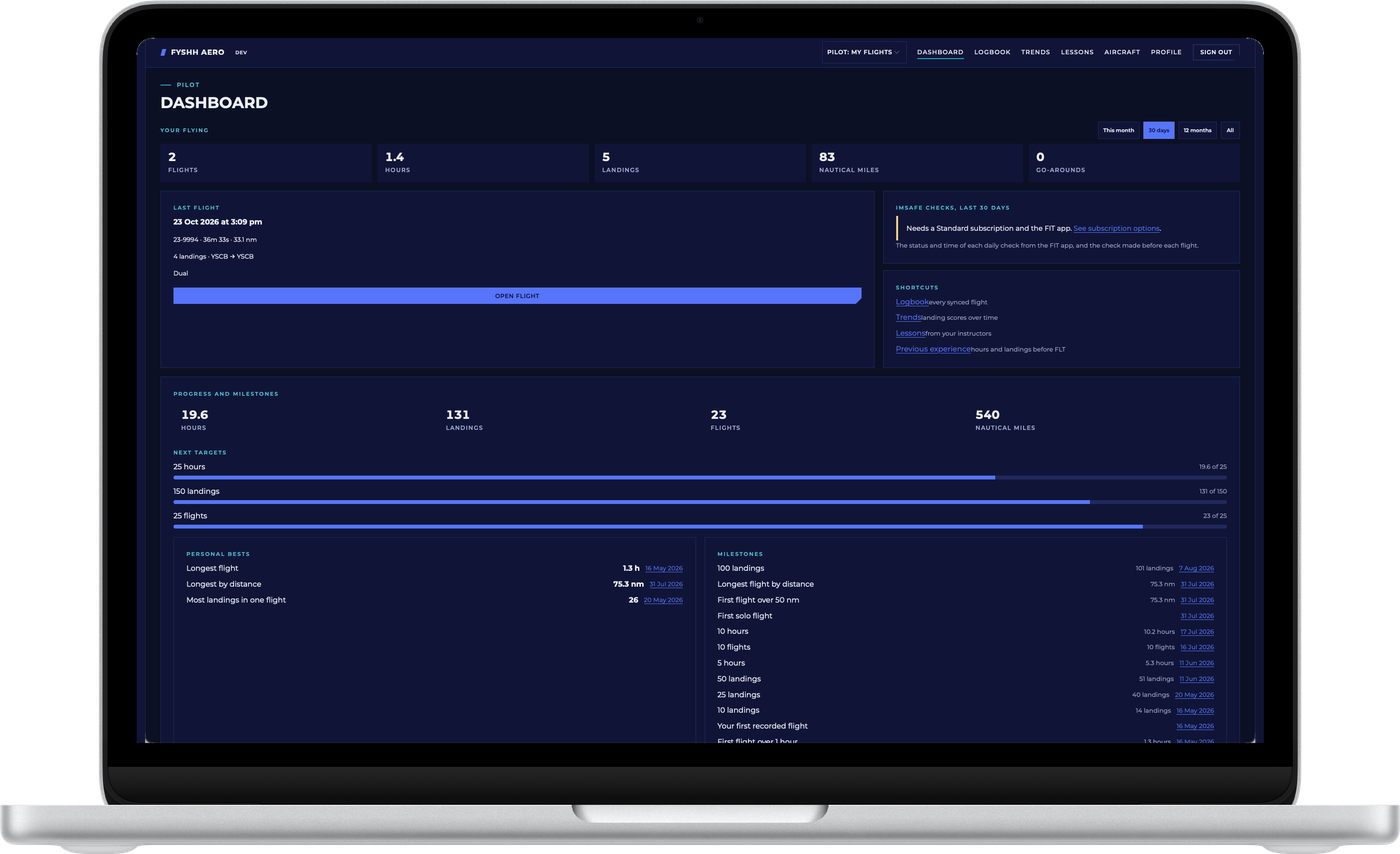
- Your flying over a period. Flights, hours, landings, nautical miles and go-arounds for this month, the last 30 days, the last twelve months or all time, with your last flight a click away.
- Progress and milestones. Total hours, landings, flights and distance since your first recorded flight, with the next targets drawn as progress bars and the milestones you have passed, each dated: first solo, first flight over 50 nautical miles, 100 landings.
- Personal bests. Your longest flight by time and by distance and the most landings in one flight, with the date of each.
- Previous experience. Enter the hours and landings you flew before FLT and they count towards your totals and targets without triggering milestones you earned years ago.
Logbook
Every synced flight in one table you can filter
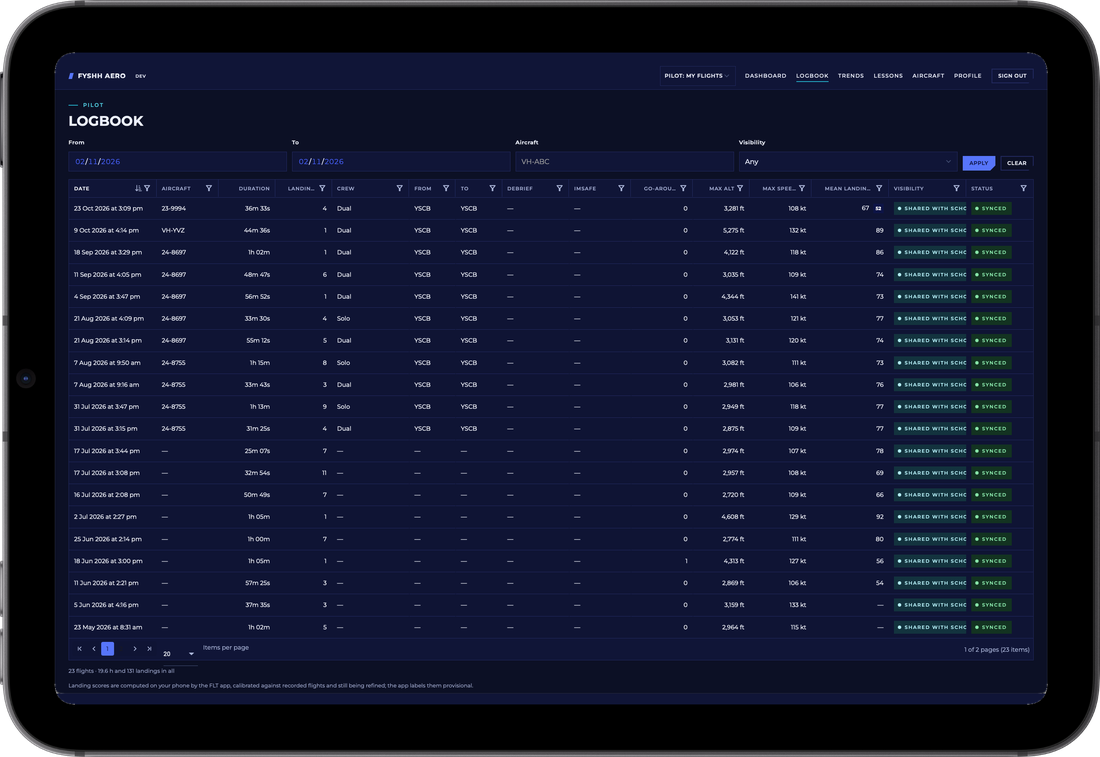
- Filter by date, aircraft and visibility, then sort any column: duration, landings, crew, departure and arrival aerodromes, go-arounds, maximum altitude and speed, mean landing score.
- Dual, solo or in command. Each flight carries the crew flag you set in the app, with the instructor named when you flew dual, so your dual and solo hours are separated the way a logbook separates them.
- Private or shared. A visibility badge on every row shows whether the flight is yours alone or shared with your flight school, and a sync badge shows that the record, telemetry and analysis all arrived.
- Totals at the foot of the table for the flights you have filtered, ready to copy into the paper logbook.
Flight debrief
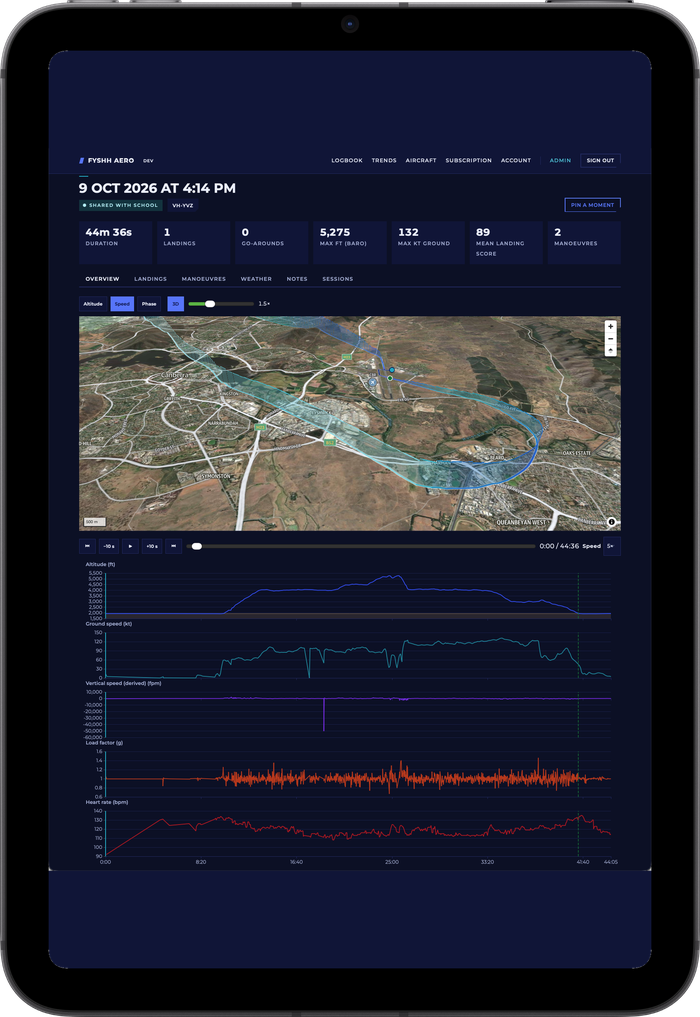
The flight in 3D, with every profile scrubbing together
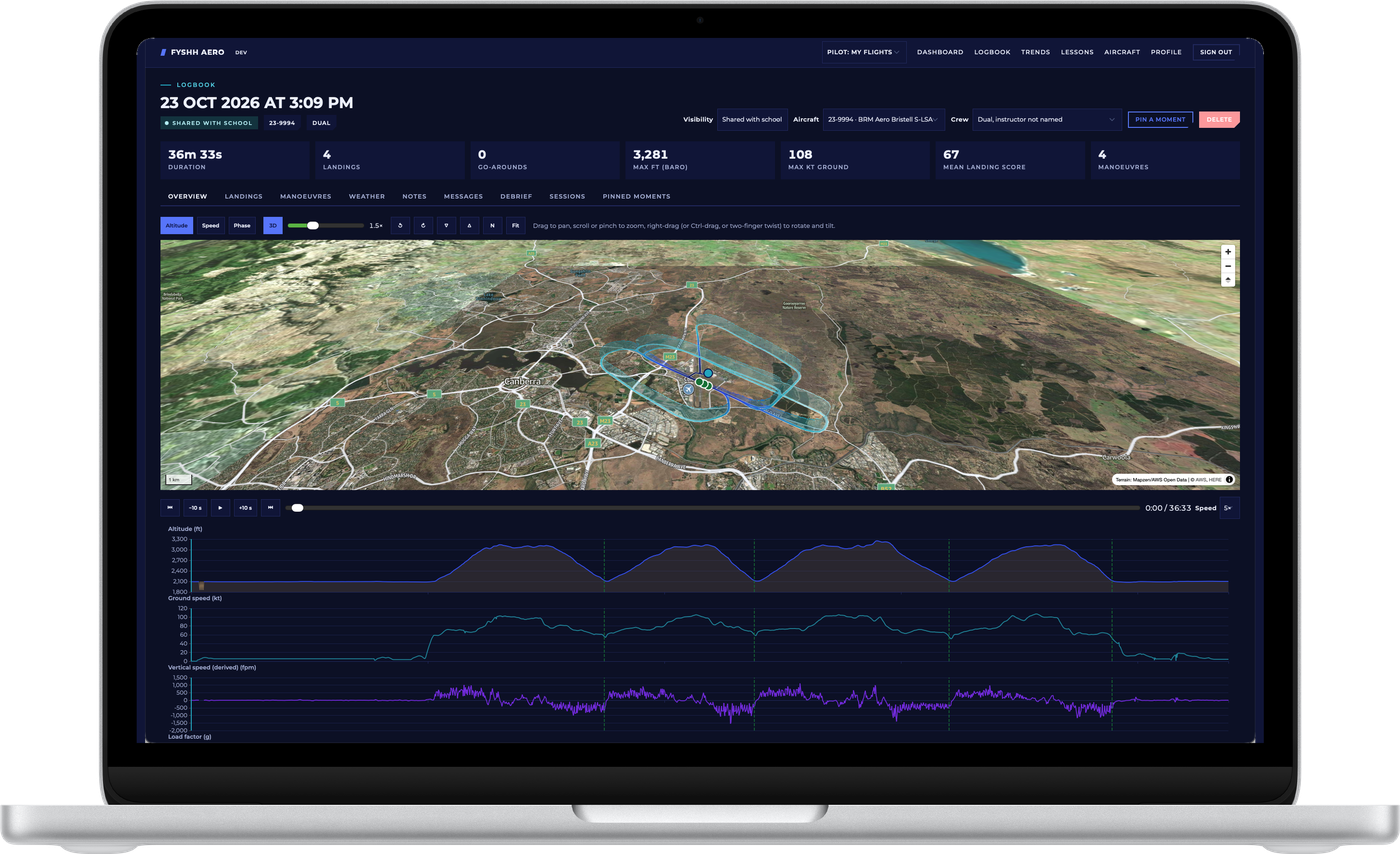
- The track at height over real terrain, coloured by altitude, speed or phase of flight, with the exaggeration, tilt and rotation under your control, satellite or street imagery beneath it, and each landing and manoeuvre marked on the track.
- Synchronised profiles. Altitude, ground speed, vertical speed, load factor and, if you opted in, heart rate, drawn under the map on one time axis. Scrub one and the aircraft moves on the map; play the flight back at up to five times speed.
- Every landing and manoeuvre. Touchdown profiles, scores and their components, each manoeuvre's traces and ground track, and the comparison against your school's reference, exactly as the app computed them. Bank, airspeed and wind are estimated from ground track unless the flight recorded load factor.
- Weather, notes and messages. The ATIS or METAR the app used for QNH, your notes, the messages your instructor sent during a live flight, and the debrief sessions attached to the flight.
- Pinned moments. Pin a moment on the timeline with a note; an instructor can do the same on a shared flight, and their notes reach the app as read-only instructor notes.
Trends and lessons
Whether the landings are getting better, and what your instructor said
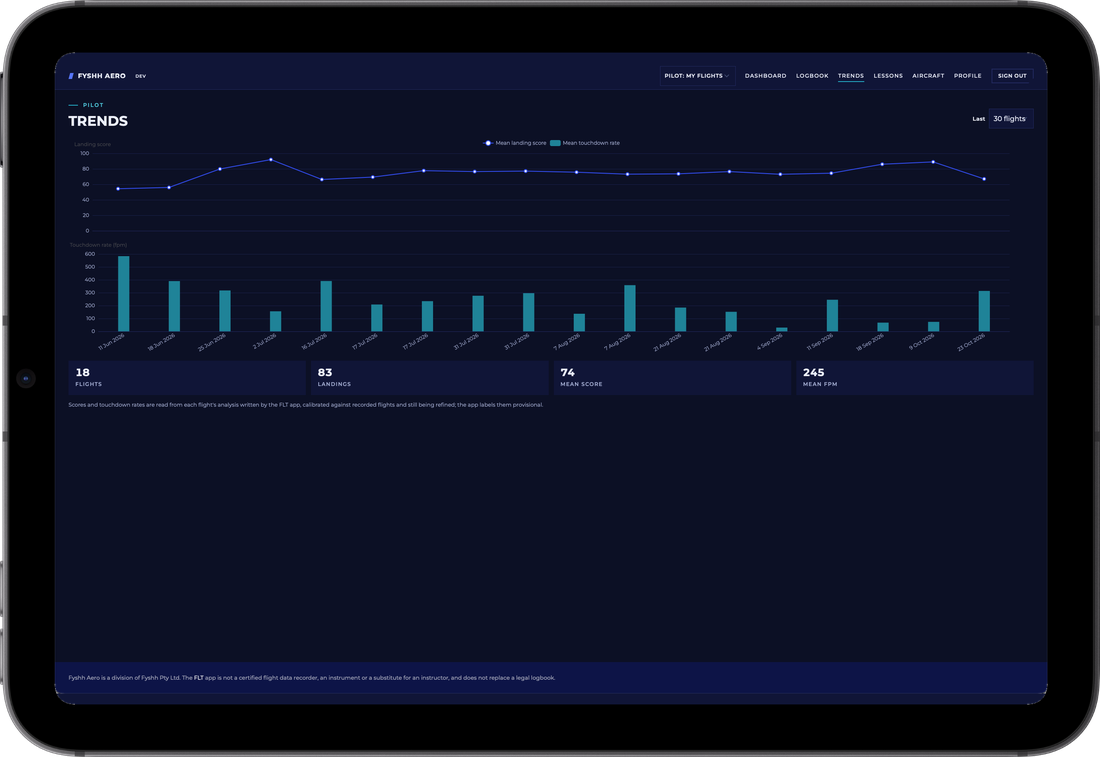
- Landing trends. Mean landing score and mean touchdown rate for each of your last ten to all of your flights, with the flights, landings and averages for the range beneath. Scores are calibrated against recorded flights and still being refined, and the portal labels them provisional as the app does.
- Lessons. The lessons your instructors have logged against the school's syllabus, with the competencies assessed, their notes and the plan for the next lesson, read-only, with room for your own notes afterwards.
- Aircraft. Your own aircraft, looked up from the register by registration, beside the school's fleet, so every flight is filed against the right airframe.
- Account and subscription. Your profile, the school you are flying with, your Standard subscription or the free plan, and the switches for flight sync and live streaming.
On any screen
Built for the instructor's laptop and the briefing-room television, and it works on a tablet
The portal is laid out big-screen first, because that is where a debrief happens, and it scales down to an iPad for a debrief in the aircraft or the crew room. On a phone it keeps to the account and enrolment pages; the FLT app is the phone's debrief tool.
Everything here depends on flight sync, which is a switch you turn on in the app with a free Fyshh Aero account. Recording, the logbook and landing counts in the app never need an account at all. Read what changes with an account.
For flight schools and instructors
Sign in, choose the school, and work as the school
An instructor or school admin switches from their own flying to the school with one control in the header. Only flights a student has chosen to share with the school appear; private flights are filtered out before they leave the database.
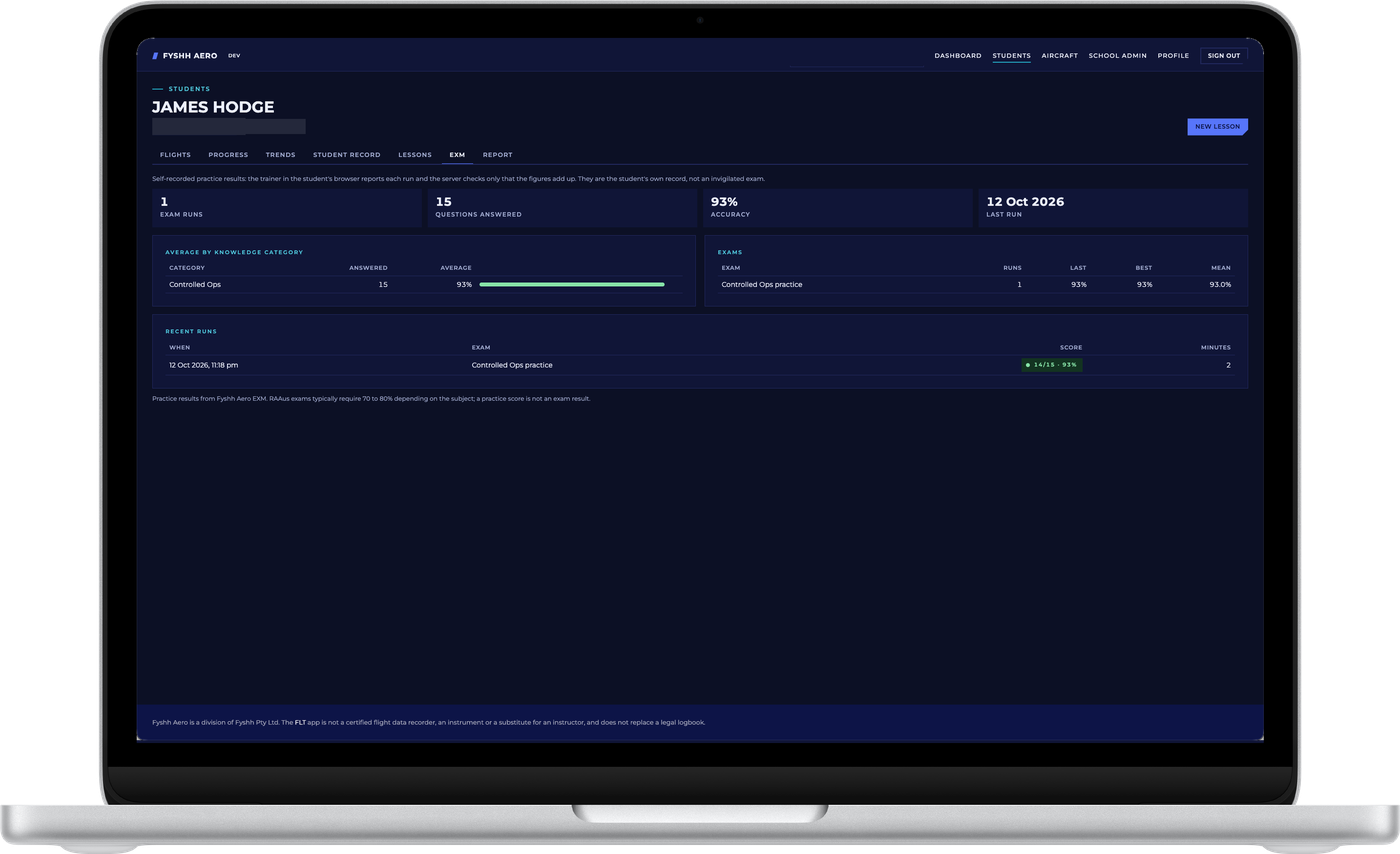
Students
One record per student, from first lesson to licence
- Find a student by name, e-mail, stage of training or last flight, and open their shared flights, progress and milestones, landing trends, student record, lessons and reports from one set of tabs.
- The student record. Training type, stage, preferred instructor, licences with their expiry, milestones such as first solo, and a currency snapshot from the landings and hours they have flown recently.
- Lessons against the syllabus. Log a lesson, link the flights it covered, assess the competencies, write the plan for next time and sign it. Signed lessons are immutable; corrections are new entries that reference the original.
- Debrief every shared flight on the same 3D map and profiles the student sees, pin moments with comments that reach their FLT app, and mark instructor-flown segments so they restyle the flight and stay out of the student's landing count.
A dashboard of the school's flying
Students, hours, landings and nautical miles over the period you choose, a map of every student flight streaming at that moment, and the day's shared flights as a debrief list.
Watch a solo as it happens
A streaming flight's position, altitude, speed and landing count arrive every few seconds. A linked instructor watches it on the terrain map, and can send a check-in or a pre-set phrase that the student answers with one tap on the watch, never by typing. The radio always takes precedence.
The fleet and the references
The school's aircraft, looked up from the CASA, RAAus and FAA registers, appear in every student's app for one-tap selection, with each aircraft's approach speeds so landings are judged against the right numbers. The reference library is published to enrolled students from the same place.
Members, enrolment and billing
School admins manage instructors and students, enrolment codes with a printable poster, instructor-student links, the syllabus, school settings and, when the school pays for its students, the monthly seats.
The full description of the school portal, the four steps from an instructor's demonstration to every student's phone, and the school pricing are on the flight schools page.
What stays yours
Shared means shared with the people you chose
Only shared flights are visible to a school, and only to the instructors linked to you and the school's admins. A private flight is never streamed and never listed. Delete a flight and it leaves the portal at once; delete the account and everything goes with it.
Synced flights are stored in private storage in Australia. The portal is not a certified flight data recorder, an instrument or a substitute for an instructor, and it does not replace a legal logbook.
Read the privacy policyEvery score, count and comparison in the portal was computed on the pilot's phone by the FLT app and stored as the app wrote it. The portal draws it on a bigger screen; it never re-analyses a flight.